I have read an article that is not about techniques or filters. I am almost sure you all can recognize the photo of a vulture behind a near death girl in Africa. It gained a lot of prizes (Pulitzer for example) and it showed a real situation in that continent.
But reality can have several faces. In this article we can see a bit about... ethical photography? It is lawful to show only what you want, or should your photos reflect the real situation?
In this case, the photographer decided to show a terrific, but not very truthful, photo. Instead of gimp/photoshop he used a "legal" camera technique.
It is up to you to decide.
Link - Enlace
PS: The articule is in Spanish
Thursday, 22 March 2007

Tuesday, 20 March 2007

Thursday, 15 March 2007
Always looking for inspiration...
 This has popped up on a few different photographic blogs this week and if you really like people photography and are striving for that contemporary look with feel-good factor and have 3 minutes to spare, go and check out this flipbook presentation by George Lange.
It will leave you with a smile on you face and have you thinking how can you apply his techniques to you own images. Just look at the wonderful quality of light that the images exude...
...and if you still have the time afterwards, and are suitably inspired, take a look at the rest of his website.
Tuesday, 13 March 2007
A box with a hole... the fascinating world of the pinhole camera...
With the modern digital camera its very easy to become complacent about making images... the camera can focus, meter, judge colour temperature, sharpen, add contrast etc.. etc... perfect photo's almost all the time no..???
How about a camera that uses film (oh no not the f word..!), has no shutter button, you can't focus it.. hell... it doesn't even have a lens... just a very small hole... welcome to the world of the pinhole camera.
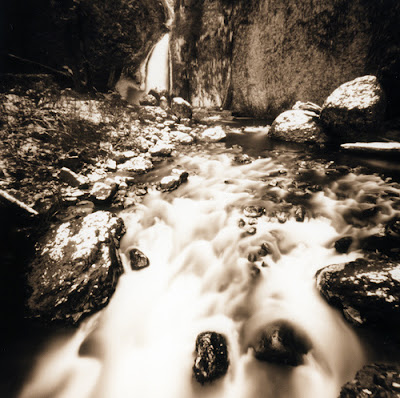
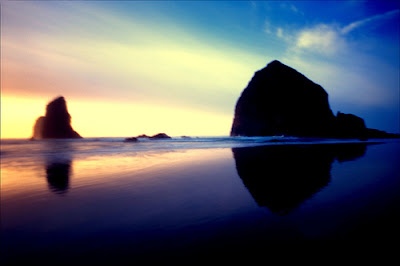
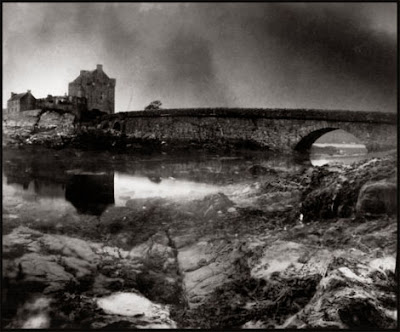
Exposure times in bright sunlight with a slow film can be measured in tens of seconds and as the sun goes down you could be talking hours to expose the film correctly... issues with Reciprocity failure, colour shifts, grain... and you can't even see what you got until the film comes back from the lab...!.. Why oh why would anyone use such a god forsaken contraption... Because you can create wonderful ethereal images, images that no amount of photoshop trickery can produce, they are not perfect and that's exactly their beauty...
If your a bit of a DIY expert you can even make one yourself (like this guy who built one from a 150 year old child's skull !!), if not, then you can go to Zero Image who have an entire range to choose from...
And for those of you who can't bear the thought of having to use film, you can even turn your digital SLR into a pinhole...
Recommended Galleries and reading :
Isabelle Lousberg...
Zeb Andrews...
Mackeson...
The Pinhole Resource...
How about a camera that uses film (oh no not the f word..!), has no shutter button, you can't focus it.. hell... it doesn't even have a lens... just a very small hole... welcome to the world of the pinhole camera.

Exposure times in bright sunlight with a slow film can be measured in tens of seconds and as the sun goes down you could be talking hours to expose the film correctly... issues with Reciprocity failure, colour shifts, grain... and you can't even see what you got until the film comes back from the lab...!.. Why oh why would anyone use such a god forsaken contraption... Because you can create wonderful ethereal images, images that no amount of photoshop trickery can produce, they are not perfect and that's exactly their beauty...

If your a bit of a DIY expert you can even make one yourself (like this guy who built one from a 150 year old child's skull !!), if not, then you can go to Zero Image who have an entire range to choose from...

And for those of you who can't bear the thought of having to use film, you can even turn your digital SLR into a pinhole...
Recommended Galleries and reading :
Isabelle Lousberg...
Zeb Andrews...
Mackeson...
The Pinhole Resource...
Wednesday, 7 March 2007
Nuri Bilge Ceylan's stunning imagery...
 I highly recommend that you go and take a look at the 'Turkey Cinemascope' portfolio of Nuri Bilge Ceylan, a film director from Istanbul, whose panoramic images capturing both landscapes and portraits exemplify the stunning use of light to create a three dimensionality that is so difficult to achieve and often the holy grail of many photographers.
 I draw a lot of inspiration and motivation from viewing outstanding images from other photographers and then trying to achieve the same. I personally think that to become a better photographer you have to look at photographs, understand what you like and don't like and try and put those feelings back into your own photography...
These images must look stunning in print (you can get a idea from the photo below of his exhibition in Thessaloniki)... looking at his website I see that he will exhibit in Granada during the Cines del Sur Film Festival which is from the 9th-17th June...
Should we organise a club trip..??

Lens Hoods...
 Lens hoods are good... they keep that straylight out of your lens and prevent something called 'flare', which is even more important to prevent if you permanently have a UV filter stuck on the end of your lens (we'll leave the filter or no filter debate for another time)...
If you lens comes with one already... great... make sure you use it... but with a lot of lenses nowadays its an optional extra... and often an expensive one... well.. lenshoods.co.uk comes to the rescue with free printable lenshoods which you can make out of paper or thin plastic... I'm certainly going to give it a try... I'll let you know how I get on...
Thursday, 1 March 2007
Virtual collages...
 A few people have asked how I did the collage effect on the Torres Kio image I presented recently.
Basically, you have to choose a spot where you see the entire scene you want to capture. Select a focal length, not so long that you need 200 photos and not too short that you only get 3. Set your camera to manual (if you can) so the exposure doesn't differ between each photo and start clicking away.. but don't change your position and try and move the camera around a bit so the images are not all on the same plane (and don't forget to re-focus as you go along).
Then you need any image manipulation software that allows you to resize, rotate to any angle, and change opacity of your images... and then you basically start overlaying the images on top of each other to build up the complete scene... adjust contrast and saturation to taste and there you have it...
It can be a bit time consuming depending on the amount of images you have and how precisely you want to match them up... but it can make an otherwise touristy shot turn into something a bit move interesting...
There's a tutorial over at Photojojo that describes the technique in detail that you should take a look at, there also other examples that may inspire you further...
Wednesday, 28 February 2007
Theme 1 - 'Whatever you want'...
 Our first Theme showing turned out to be a roaring success, with almost every member of the club presenting images, and those that didn't were there to view, give comments and ask questions... The images above give you a taste of what was presented (click for bigger size)... if you want to see all the images shown, pop over to our galleries page and look under 'Themes set by the Club' (link is at the top right of this page) and feel free to leave comments on individual images, I'm sure the authors will be interested to know what you think...
There was a good cross section of images with travel photography from Argentina, New Zealand and Japan (some people have all the luck..!), to demonstrations of hand holding techniques extraordinaire (8 seconds..!), fractals in nature, 3D, night photography, low light photography, architectural photography, impressive landscapes, zooming techniques and burning light bulbs...
Great job everyone..!
Next theme is 'Architecture'.... can't wait to see what you all come up with..!
Monday, 26 February 2007
Model Photography... ;-)
 Is it real or is it a model.?.. Someone with far too much time on their hands or trickery...
Well....... its real but it looks like a model don't you think..? This effect can be done quite easily if you happen to own a Tilt and Shift lens... which I imagine none of us do, because its used mainly in architectural photography to handle perspective issues which normally arise when you point you camera up in the air to take a picture of your favourite building and find out when you look and the image afterwards that it looks like its falling over or that it has slopey sides... anyway I digress... what in reality your doing with this type of lens is controlling the plane of focus... but the interesting thing is we can also fake it digitally...
Go here and here for step by step tutorials (They are for Photoshop so I'll leave Manuel to tell us how to do it in Gimp), the only thing that I would recommend is that you take your original image from above the subject as this is how you normally look at one of these types of models, and that it is well lit, so that you can pump up the saturation to give it that kind of smooth plasticky look... all adding to the illusion...
If you like the idea, check out these examples, some of which you'll have a hard time believing that they are not models.!.
Tuesday, 20 February 2007
Use YouTube to learn Photoshop
For anyone who is interested in learning Photoshop, YouTube (and other video sites) can be a good source of free learning that you might not have thought of. Both YouTube and MetaCafe have a lot of photoshop video tutorials and while not all are the best quality video, the ability to see techniques in action with video is great for quick learning.
The following page has a collection of links to these video tutorials: http://www.fortysomething.ca/mt/etc/archives/006129.php
As an example, it post here the linked video about Chroma Keying (removing objects from their background).
The following page has a collection of links to these video tutorials: http://www.fortysomething.ca/mt/etc/archives/006129.php
As an example, it post here the linked video about Chroma Keying (removing objects from their background).

Friday, 16 February 2007
Camera tossing... a new olympic sport...??
 Came across this recently and thought it was pretty ironic when you consider that most of the time we are trying to eliminate movement of the camera in anyway possible (tripods, image stabilisation etc)... Serendipity is the name of the game when you launch your camera into the air (and hopefully catch it again) but the results can be quite stunning... check out this blog for all the facts and techniques... Lets see if anyone dares to try, inspiration for the 'Whatever you want' theme possibly?
(credit to Ryan Gallagher for the inspiration)
Thursday, 8 February 2007
Books on photography?
Hi photo enthusiasts,
Perhaps it is a good idea if we select a few (to start with) good books on different aspects of photography for reference and such. This could be the start of a small 'photoclub-library'. I at least find it nicer to read of paper than from a screen, and we don't all need the buy the same book ;-) Anyone suggestions?
A quick and dirty search on amazon gives me for example:
- Understanding Exposure, by Bryan Peterson
- The Digital Photography Book by Scott Kelby (2006)
- The Complete Guide to Close Up & Macro Photography by Paul Harcourt Davies (2002)
- Digital Macro Photography by Ross Hoddinott (2006)
Also, perhaps a magazine subscription (which one?) is feasible.
In the mean time, Wikibooks provides several free content 'books' related to photography.
http://en.wikibooks.org/wiki/Digital_photography
http://en.wikibooks.org/wiki/Basics_of_the_Camera
http://en.wikibooks.org/wiki/Basic_Photography
And on Wikipedia itself you can find the "Photography Portal" a good starting point for numerous Wikipedia entries related to photography.
http://en.wikipedia.org/wiki/Portal:Photography
http://en.wikipedia.org/wiki/Photography
Printed versions could also be collected in the 'photoclub-library'....
Perhaps it is a good idea if we select a few (to start with) good books on different aspects of photography for reference and such. This could be the start of a small 'photoclub-library'. I at least find it nicer to read of paper than from a screen, and we don't all need the buy the same book ;-) Anyone suggestions?
A quick and dirty search on amazon gives me for example:
- Understanding Exposure, by Bryan Peterson
- The Digital Photography Book by Scott Kelby (2006)
- The Complete Guide to Close Up & Macro Photography by Paul Harcourt Davies (2002)
- Digital Macro Photography by Ross Hoddinott (2006)
Also, perhaps a magazine subscription (which one?) is feasible.
In the mean time, Wikibooks provides several free content 'books' related to photography.
http://en.wikibooks.org/wiki/Digital_photography
http://en.wikibooks.org/wiki/Basics_of_the_Camera
http://en.wikibooks.org/wiki/Basic_Photography
And on Wikipedia itself you can find the "Photography Portal" a good starting point for numerous Wikipedia entries related to photography.
http://en.wikipedia.org/wiki/Portal:Photography
http://en.wikipedia.org/wiki/Photography
Printed versions could also be collected in the 'photoclub-library'....
A poisonous chameleon
I think that digital photography is a two part history. Neal taught us a lot about the first part the other day. Shuttering, exposure, iso, light... and a lot of things that are to come are common (more or less) with traditional photography.
But this is a new era. We do not have films anymore, but bytes. After taking a photo there are a lot of things you can do: correct white balance, increase sky saturation or just transform them to a funnier photo.
Yes, Photoshop is the word. But as it lacks some useful characteristics (you have to pay for it, it does not work under Linux) so I will try to convince you about using the best alternative: GIMP.
There are tons of good information about Gimp, and most existing about Photoshop is somehow "compatible" with this free software. I suppose that the best entry point to this program is:
www.gimp.org
And if you want a free introductory book you can also look at:
http://gimp-savvy.com/BOOK/index.html
I pickup Neal's chameleon photo and transformed a bit just to show an example of what you can do in just a few minutes. Next time I will teach you how to change someone's hair colour.
 Neal's chameleon poisonous cousin
But this is a new era. We do not have films anymore, but bytes. After taking a photo there are a lot of things you can do: correct white balance, increase sky saturation or just transform them to a funnier photo.
Yes, Photoshop is the word. But as it lacks some useful characteristics (you have to pay for it, it does not work under Linux) so I will try to convince you about using the best alternative: GIMP.
There are tons of good information about Gimp, and most existing about Photoshop is somehow "compatible" with this free software. I suppose that the best entry point to this program is:
www.gimp.org
And if you want a free introductory book you can also look at:
http://gimp-savvy.com/BOOK/index.html
I pickup Neal's chameleon photo and transformed a bit just to show an example of what you can do in just a few minutes. Next time I will teach you how to change someone's hair colour.
 Neal's chameleon poisonous cousin
 Wednesday, 7 February 2007
Heaven, Earth, Tequila....
Mediastorm, a company attempting to mix photojournalism with story telling, has some fantastic presentations on their website which bring together music, narrative and the latest slide show techniques... This presentation in particular I find absolutely stunning (click image to view)

.....and after you have finished with this one its definitely worth the time to investigate further the other presentations available... enjoy...
.....and after you have finished with this one its definitely worth the time to investigate further the other presentations available... enjoy...
Tuesday, 6 February 2007
Camera Basics Presentation...
 Thanks to all of you for turning up and doing me the honour of listening to my incessant ravings about metering, aperture and shutter speed... just how many gray blocks can people stand..!
I hope that it was useful in someway.
A big, big thanks to Marco, our model, who suffered having his retinas burnt and his face scorched by the torture device... oops I mean... 'ring-light'.. That's him above holding up under the pressure at F1.8... (that should mean something to you now..!)
Sunday, 4 February 2007
Friday, 2 February 2007
Want to remove people from your photo's.?...
Remember the scene in 'Abre los ojos' where the guy is running around Gran Via in Madrid and there's not a person in sight.... well... this chap has a piece of software that will allow you to create your very own empty Gran Via... automatically..(damn... could I use something like that every time I drive in Madrid....!!)...
While you at it, you might want to check out his tone hacker as well...
While you at it, you might want to check out his tone hacker as well...
For the Nikon owners amongst us...
Over on Andy Frazers Blog he talks about long exposures with the Nikon D200, something that in the past was one of the disadvantages of digital... Well, Laura Elskan appears not to have too many problems.
Have a look..... what do you think if we do a club outing to try and do a similar thing ? (even if you don't have a nikon..)...
Have a look..... what do you think if we do a club outing to try and do a similar thing ? (even if you don't have a nikon..)...
Thursday, 1 February 2007
HDR and things that move...
 After reading some comments made by Mauro to the previous post I thought it might be useful to mention that if you like this HDR thing, but were put off by the fact that you have to use a tripod and obviously things in the image can't move between frames, this somewhat restricting you subject matter.... There is actually a way of making HDR images with just one frame.
For example, look at the fella above, who I found when we were on holiday in Andalucia (didn't know Chameleons where indigenous to the south of Spain !), although not known for his blistering speed, he wasn't going to hang around while I set up the tripod etc, etc... and anyway, what his body lacked in velocity, his eye more than made up the difference.... So one frame was all I got...
Well then, if your camera can shoot in Raw and you use this mode of operation you can create 3 images using the raw converter that you need to handle these sort of images. Basically, you bias the exposure -2 stops from the original, save the image, same again for + 2 stops... and there you have it 3 images to plug into you HDR software... and thanks to the latitude of the raw image you can get away with it (most of the time). Obviously, it depends on the exposure of your original image (i.e don't completely blow the highlights because you can never recover them) and it doesn't quite produce the same level of subtlety as 3 separate images... but hey you getting 3 for the price of one..
Subscribe to:
Posts (Atom)